One of the more recent additions to flotools is a feature we call Imported Data. Imported Data allows you to add a series to a plot using data that is not in the OLGA files themselves.
The example below walks you through the steps required to add a phase envelope to an X-Y plot.
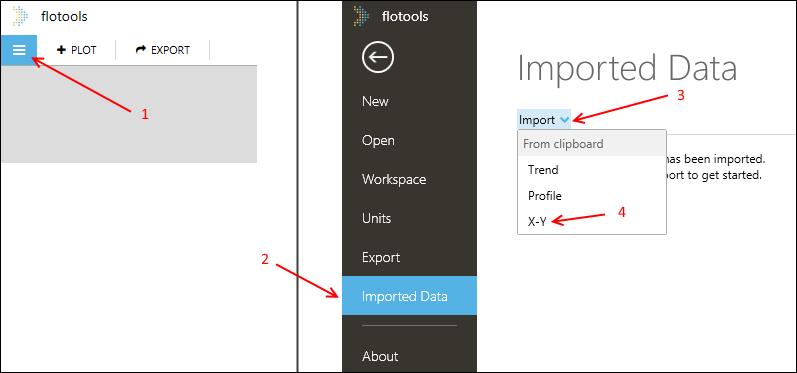
1. In a workspace, open the Imported Data menu by clicking the flotools menu button
2. Open the Imported Data section
3. Click the Import button
4. Click X-Y to create a new imported X-Y series

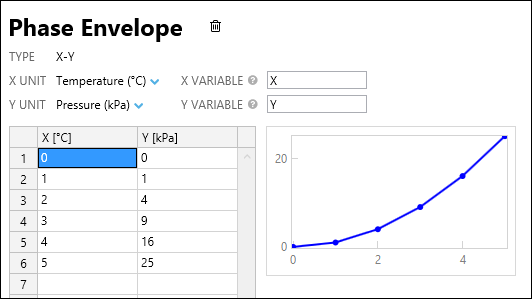
5. Enter the details for the new X-Y series. Data can be entered into the table by hand or copied and pasted from Excel or a data file. flotools supports comma-, space-, and tab-delimited formats when pasting.

6. Open the X-Y plot to which you want to add the imported data
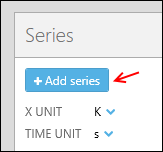
7. Click ‘Add Series’

8. Search for the imported series by name
9. Click the item under ‘X’, then the item under ‘Y’



 5. Enter the details for the new X-Y series. Data can be entered into the table by hand or copied and pasted from Excel or a data file. flotools supports comma-, space-, and tab-delimited formats when pasting.
 6. Open the X-Y plot to which you want to add the imported data
7. Click ‘Add Series’
6. Open the X-Y plot to which you want to add the imported data
7. Click ‘Add Series’
 8. Search for the imported series by name
9. Click the item under ‘X’, then the item under ‘Y’
8. Search for the imported series by name
9. Click the item under ‘X’, then the item under ‘Y’
